Building a Desktop Companion App for Path of Exile 2 with Tauri and React
I've been playing Path of Exile 2 since the first day of early access, and like a lot of people in the community I found myself constantly tabbing out of the game to check wiki pages, look up currency prices, figure out where I was in the campaign, and try to remember which zones I'd already cleared. Even with thousands of hours across POE 1 and 2, it becomes overwhelming trying to commit a small encyclopedia to memory while referencing a dozen browser tabs. This process has always felt unorganized and frustrating – which is why on Windows there are multiple overlay tools that help streamline the experience.
So, like a madman, I spent the first year of the game's release building a companion app from scratch and continually iterating on it as I played. The result is Overlord, a desktop application that sits alongside Path of Exile 2 and gives you real-time information about your character, the economy, your campaign progress, and zone statistics. All of this achieved by reading the game's log file and pulling data from community APIs. It's built with Tauri 2 on the backend (Rust) and React 19 on the frontend (TypeScript).
This is Part 1 of a series where I'll walk through the architecture, the implementation, and the lessons I learned while taking my first stab at building not only a Rust application, but also a native desktop one. This post covers the "why" behind the project and the high-level decisions that shaped everything else. Let's get into it.
Why build a companion app at all?
Path of Exile 2, like its predecessor, is one of those games where the external tooling ecosystem is almost as important as the game itself. You've got community wikis, trade sites, build planners, currency trackers, leveling guides – all of them browser-based. But the workflow of playing on one screen while juggling six browser tabs on another gets old fast, especially during a league start when every minute counts.
I wanted something that could consolidate the information I actually cared about into a single window and provide insights into my gameplay. Stuff like: what zone am I in, what's the next step in the campaign, how long have I spent in this act, what are Divine Orbs trading for right now. And ideally, it would figure most of that out automatically without me having to manually input anything.
POE2 writes a Client.txt log file that records zone changes, server connections, level-ups, deaths, and a bunch of other events as you play. It's just a text file that gets appended to in real time. If you can parse that file as it's being written, you can reconstruct a surprisingly detailed picture of what's happening in the game.
Why a standalone app instead of an overlay
The first thing I looked into was building an overlay – a transparent window that sits on top of the game. That's what most companion tools do on Windows, and it makes sense. You don't have to alt-tab, the information is always available on screen, and it feels native to the experience.
On Linux, though, overlays are a completely different story. There's no unified overlay API like there is on Windows. If you're on X11, you can sort of hack something together with window type hints, but Wayland – which is what I run – doesn't have a concept of "always on top" that works consistently across compositors. Hyprland has its own layer-shell protocol, Sway has a different approach, GNOME does its own thing entirely. You'd basically be writing compositor-specific code for each one.
There's also the anti-cheat question. POE2 runs through Proton on Linux, and while the game doesn't currently have aggressive anti-cheat, overlay injection is exactly the kind of thing that gets flagged when anti-cheat systems do get involved.
So I went with a standalone window. It runs as its own application, reads the log file from disk (no game memory access, no injection, no hooking), and you put it on a second monitor or alt-tab to it. It's less flashy than an overlay but it works reliably and sidesteps the entire Linux overlay fragmentation problem.
Choosing Tauri over Electron
Once I decided on a standalone desktop app, I needed a framework. The two serious contenders were Electron and Tauri, and honestly the decision wasn't that close.
Electron bundles an entire Chromium browser and Node.js runtime with your app. It works, plenty of great apps are built on it, but the tradeoffs are steep – large bundle sizes, significant memory overhead, and a Node.js backend. For an app that needs to watch a file in real time, parse thousands of log lines, and manage concurrent HTTP requests without latency, Rust felt like the obvious choice.
Tauri uses the system's native webview instead of bundling Chromium, so the app ships a lot smaller. The backend is Rust, which gives you actual concurrency with async/await and tokio, zero-cost abstractions, and memory safety guarantees that matter when you're running background tasks for hours at a time. The frontend is still whatever web framework you want – I went with React – it just talks to the Rust backend over an IPC bridge.
The practical difference showed up immediately. Hot reload on the frontend with Vite is instant. The Rust backend compiles in a few seconds for incremental builds. The final binary is small, starts fast, and sits at modest RAM usage while running – compared to Electron apps that routinely eat 400MB or more just sitting idle. For something that's going to be running in the background while you're gaming, that matters.
Project structure
The project is organized as a Yarn workspaces monorepo with two packages: packages/backend/ for the Rust/Tauri application and packages/frontend/ for the React/TypeScript application. When you run yarn tauri dev, it spins up the Vite dev server for the frontend and the Tauri development build for the backend simultaneously – you get hot reload on the React side and recompilation on the Rust side in one terminal.
I like this split because the two halves can evolve independently. The Rust backend doesn't know or care about React – it exposes commands and emits events. The React frontend doesn't know or care about Rust – it just calls functions and listens for events. The Tauri IPC layer is the contract between them.
Domain-driven design
Early on I made the decision to organize the backend around domain-driven design principles. Not the full DDD ceremony with aggregates and bounded context maps – more the practical bits about grouping code by business domain rather than by technical layer. Each domain owns its models, traits (interfaces), service implementation, repository (persistence), and Tauri commands.
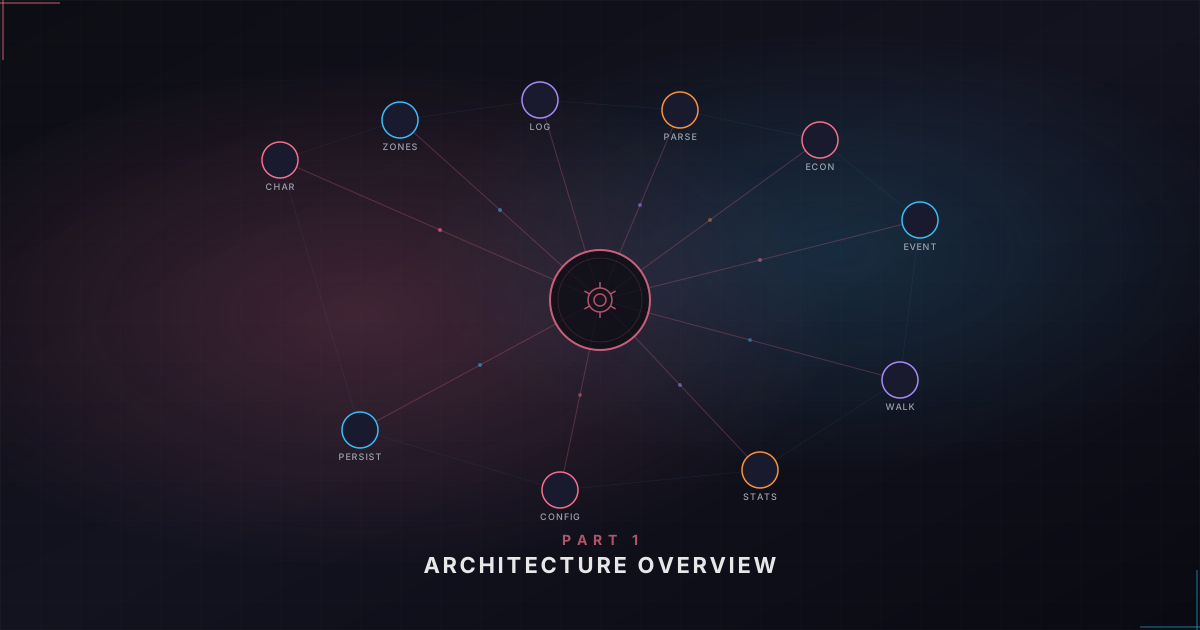
The backend has domains for things like Character management, Configuration, Economy data, Game Monitoring, Log Analysis, Server Monitoring, Walkthrough progress, Wiki Scraping, Zone Configuration, and Zone Tracking. Every domain follows the same file structure: models.rs for data structures, traits.rs for async interfaces, service.rs for business logic, repository.rs for persistence, and commands.rs for Tauri IPC handlers.
This consistency is one of those things that doesn't sound like a big deal until you're deep into the codebase and need to find where the walkthrough progress gets saved. You just know where to look.
The domains aren't completely independent – they have a dependency graph. Configuration and the event bus are foundational. Character depends on the event bus and zone configuration. Walkthrough depends on Character. And Log Analysis sits near the top because it depends on almost everything – when a single log line gets parsed, it can trigger updates to the character's location, the walkthrough progress, and the zone statistics all at once.
How the pieces fit together
If I had to describe the architecture in one metaphor, it's a nervous system. The log file is the sensory input – raw signals from the game. The domain services are the brain – they interpret those signals and decide what to do. The event bus is the wiring that carries signals to the rest of the body. And the React frontend is the face – what the user actually sees and interacts with.
In practice, the Rust backend does the heavy lifting: watching the log file, parsing events, fetching API data, managing state. When something changes, it publishes a domain event to an in-memory event bus. A bridge component subscribes to that event bus and translates domain events into Tauri window events that get pushed to the frontend. On the React side, event listeners pick up those events and invalidate React Query caches, which triggers re-renders with fresh data.
Going the other direction, when the user interacts with the UI – creating a character, changing settings, searching currencies – the frontend invokes a Tauri command. That command hits the Rust backend, runs the business logic, persists any changes, and potentially publishes more events that flow back to the frontend.
All persistence is file-based – JSON files in the OS-specific app data directory. Characters each get their own JSON file, there's an index file, a config file, walkthrough progress files, and cached economy data. No database, which keeps the overhead low and allows for easily porting your app settings to a new system if you need to.
What's next
That's the high-level view. In Part 2, we'll drop down into the Rust backend and look at how the domain structure actually works in code – async traits, dependency injection, the service registry, and file-based persistence. Part 3 will cover the log analysis pipeline, which is probably the most interesting part from a technical standpoint. And the remaining parts will cover the event-driven communication layer, the React frontend, feature deep dives, and testing.
If you're thinking about building a desktop app with Tauri, or you're curious about what a Rust + React architecture looks like in practice, hopefully this series gives you a useful reference point.