Real-Time Game Log Analysis: Parsing POE2's Client.txt with Rust
In Part 1 we talked about why I built Overlord and how the architecture is laid out. Part 2 went deep on the Rust backend – the domain pattern, Arc<T> dependency injection, service registry, and file-based persistence. This post builds directly on that foundation.
Now we get to the part I've been most excited to write about. The log analysis pipeline is the heart of the whole application. Everything else – the walkthrough tracking, the zone statistics, the character updates – all of it starts with a single text file that POE2 writes to as you play. We're going to look at how the app watches that file in real time, how it parses each line to extract meaningful events, and how a single parsed event can cascade through multiple domains.
What POE2's Client.txt actually looks like
Path of Exile 2 writes a Client.txt log file that records game events as they happen. Every time you enter a new zone, connect to a server, level up, or die, a new line gets appended. Here's what some of those lines look like:
2025/12/24 04:58:45 123456 abc [INFO Client 12345] [SCENE] Set Source [The Mud Flats]
2025/12/24 04:58:45 123456 abc [INFO Client 12345] Connecting to instance server at 123.45.67.89:6112
2025/12/24 05:15:33 123456 abc [INFO Client 12345] : MyCharacter (Sorceress) is now level 22
2025/12/24 05:22:41 123456 abc [INFO Client 12345] : MyCharacter has been slain.
Each line starts with a timestamp, followed by some internal IDs, then the actual message content. The format isn't documented anywhere – you have to figure it out by staring at the log file while playing and correlating what you see in-game with what shows up in the text. I spent a lot of evenings doing exactly that, alt-tabbing between the game and tail -f in a terminal.
The tricky part is that the log is noisy. The lines we care about are maybe 5% of the total output. So the parser pipeline needs to efficiently identify the lines that matter and ignore everything else.
Watching the file for changes
The first thing we need is to know when new content has been written. I considered using the notify crate for filesystem events, but Proton (the Windows compatibility layer that runs POE2 on Linux) does its file I/O through Wine, which doesn't always trigger inotify events reliably. After a couple days of debugging I just switched to polling and it worked instantly. Sometimes the boring solution is the right one.
The monitoring loop is straightforward. Every 100 milliseconds, we check the file size. If it's grown since last time, there's new content. If it shrunk, the file was truncated (game restarted) and we reset our position.
loop {
    interval.tick().await;
    if !*is_running.read().await { break; }

    match log_file_repository.get_file_size(&log_path).await {
        Ok(current_size) => {
            let last_pos = *last_position.read().await;
            if current_size > last_pos {
                Self::process_new_lines(/* ... */).await;
            } else if current_size < last_pos {
                *last_position.write().await = current_size;
            }
        }
        Err(e) => error!("Failed to get log file size: {}", e),
    }
}
This runs inside a tokio::spawn so it's on its own async task, completely independent of the rest of the application. When new content is detected, we read from the last known byte position to the end of the file – we're tracking byte positions, not line numbers, because the file can be massive after a long play session.
The parser pipeline
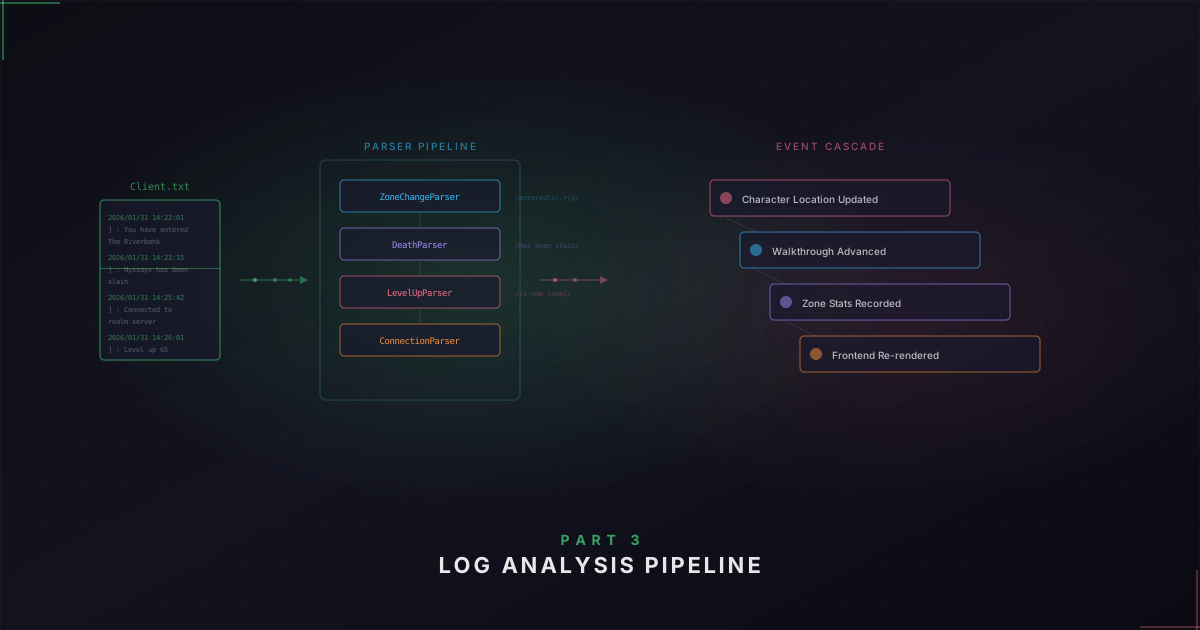
Once we have the new lines, each one gets fed through the LogParserManager. It holds a list of parsers and runs each line through them in order. First match wins.
Each parser implements a LogParser trait with two key methods: should_parse (a fast check, usually just line.contains(...)) and parse_line (the actual extraction work). Having these as two separate methods means we skip the expensive regex matching on lines that obviously don't match.
The scene change parser is the most important one – this is how we know what zone the player is in. It looks for [SCENE] Set Source [ or [SCENE] Load Source [ in the line, then extracts the zone name from between the square brackets. This one doesn't even need regex – the patterns are fixed strings.
The other parsers handle deaths, level-ups, server connections, and zone levels:
// Character death
Regex::new(r"\[INFO Client \d+\]\s*:\s*(\S.*?)\s+has\s+been\s+slain\.$")

// Character level-up
Regex::new(r"\[INFO Client \d+\]\s*:\s*(.+?)\s+\(.+?\)\s+is\s+now\s+level\s+(\d+)$")
So a line like : MyCharacter (Sorceress) is now level 22 gives us character name "MyCharacter" and level 22.
Session gap detection
Here's a problem I didn't think about until it bit me. Let's say you're playing at 11 PM, you enter The Mud Flats, and then you close the game and go to sleep. You come back the next morning and start playing again. The app sees the timestamps jump from 11 PM to 8 AM. Without accounting for that gap, the zone duration for The Mud Flats would show 9 hours instead of the few minutes you actually spent there.
The solution is session gap detection. Before processing a batch of new lines, we compare the timestamp of the first new line against the last timestamp we saw. If the gap exceeds a threshold (default 30 minutes), we finalize all active zones with the old timestamp, not the current one. This prevents phantom play sessions from showing up in your stats.
The cascade: one log line, many updates
This is where the domain-driven design from Part 2 really pays off. When the parser detects a scene change – let's say the player just walked into Clearfell – here's what happens under the hood.
First, we filter out act names. POE2 logs scene transitions for both zones and act title screens. We don't want to track "Act 1" as a zone the player visited.
Next, we look up the zone in the zone configuration service to get its metadata – act number, whether it's a town, area level. If the zone isn't in our config yet (maybe it's new in a patch), we create a placeholder and fire off a background wiki fetch to fill in the details. That wiki fetch runs in its own tokio::spawn – we don't block the main processing loop waiting for an HTTP request.
Then we handle the zone transition:
// Leave the previous zone if different
if let Some(active_zone) = character_data.zones.iter().find(|z| z.is_active) {
    if active_zone.zone_name != zone_name {
        character_service.leave_zone(character_id, &previous_zone_name).await;
    }
}

// Enter the new zone
character_service.enter_zone(character_id, zone_name).await;
Leaving a zone records the exit timestamp and calculates duration. Entering updates the character's current location. After the transition, we publish a character_updated event to the event bus, which eventually reaches the frontend and triggers a UI refresh.
And we're not done. The walkthrough service also gets notified:
walkthrough_service.handle_scene_change(character_id, content).await;This checks if entering this zone means you've progressed to the next step in the campaign guide. If you just entered The Mud Flats and that's the completion zone for your current step, your walkthrough progress ticks forward.
So from one log line – [SCENE] Set Source [Clearfell] – we've looked up zone metadata, finalized the previous zone's duration, entered the new zone, updated timestamps, persisted changes to disk, published a domain event, and advanced the walkthrough progress. This is what I mean when I say the log analysis service is the funnel. It sits at the top of the dependency chain for a reason.
Deaths and level-ups
Deaths and level-ups follow a simpler pattern. When the parser detects a death, we match the character name from the log line against the active character – POE2 can show death messages for other players in the same zone, so we only record deaths for your character. Level-ups work the same way: match the name, update the level.
Lessons learned
Building this pipeline taught me a few things worth sharing.
Polling beats event-driven for cross-platform file watching. When your file is written by a Windows application running through a compatibility layer on Linux, fancy filesystem notification APIs are less reliable than checking the file size on a timer.
Log file truncation is real. When POE2's client restarts, it can truncate Client.txt to zero bytes. If you're tracking byte positions and the file suddenly gets smaller, handle that gracefully.
Session gaps need explicit handling. Without the threshold check, players who leave the game overnight would come back to inflated zone durations. This was one of the first bug reports I got from friends testing the app.
Don't block on network calls during parsing. The wiki fetch runs in its own spawned task so we don't hold up line-by-line processing while waiting for HTTP.
What's next
That covers the log analysis pipeline – how Client.txt gets watched, parsed, and turned into domain events. In Part 4 we'll look at how those domain events actually reach the frontend. The event bus, the Tauri event bridge, and how React Query cache invalidation creates a reactive UI that updates in real time.
If you want to check out the project, head over to the Overlord project page. Thanks for reading and happy coding!