Frontend Architecture: React 19 with TanStack Router and Query in a Tauri App
We're changing gears in this one. Parts 1 through 4 have been all about the Rust backend – the domain structure, log parsing, the event bus, and the IPC bridge. If you've been following along, you know how a single line in Client.txt turns into a domain event that eventually reaches a React component. But we glossed over what happens once that data actually arrives in the browser.
This post is about the other half of the application. The React frontend is where all that backend work becomes something a human can actually look at and interact with. I want to walk through how the routes are set up, how state management works, how the context providers fit together, and how the components are organized.
File-based routing with TanStack Router
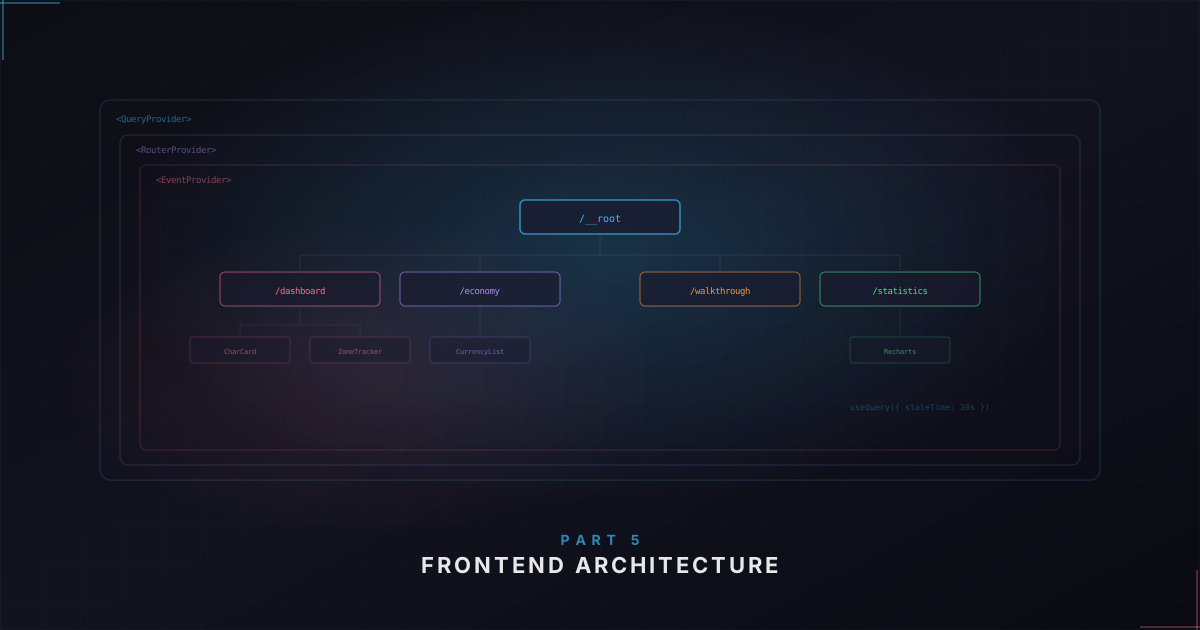
I went with TanStack Router for routing, which might seem like an unusual choice for a desktop app. But it has a killer feature: file-based routing with automatic code splitting. You drop a file in the routes/ directory, and the Vite plugin generates the route tree for you.
// src/routes/economy.tsx
import { createFileRoute } from '@tanstack/react-router';

export const Route = createFileRoute('/economy')({
  component: EconomyPage,
});

function EconomyPage() {
  // ...
}
That's it. No route registration, no centralized route config. The file path is the route. routes/index.tsx becomes /, routes/economy.tsx becomes /economy, and so on.
The routes cover the main features: a Dashboard with character status and exchange rates, a Walkthrough page with step-by-step progress tracking, a Playtime page with zone statistics and charts, an Economy page for currency prices, a Characters page for CRUD operations, and Settings.
The root layout
The root route is where the app shell lives – the persistent UI that stays on screen regardless of which page you're on:
export const Route = createRootRoute({
  component: () => (
    <div className="bg-zinc-900 h-screen overflow-hidden">
      <WindowTitle />
      <SidebarNavigation />
      <div className="h-full mt-[30px] ml-12 overflow-auto">
        <Outlet />
      </div>
      <StatusBar />
    </div>
  ),
});
WindowTitle is the custom title bar – we set decorations: false in Tauri config because the system chrome doesn't match our dark theme. SidebarNavigation is a narrow icon sidebar on the left. StatusBar shows game process status and server ping at the bottom. And Outlet is where the active route gets rendered.
Every route uses the same PageLayout component – a simple CSS grid with a left column for main content and a right column for insights and charts. I thought about doing something more flexible, but honestly every page looks good with this split. YAGNI won here.
Server state with TanStack React Query
All communication with the Rust backend goes through React Query. It wraps invoke() calls and gives us caching, background refetching, loading states, and cache invalidation for free.
The query hooks follow a consistent pattern with centralized query key factories:
export const characterQueryKeys = {
  all: ['characters'] as const,
  lists: () => [...characterQueryKeys.all, 'list'] as const,
  detail: (id: string) => [...characterQueryKeys.all, 'detail', id] as const,
  active: () => [...characterQueryKeys.all, 'active'] as const,
};

export function useCharacters() {
  return useQuery({
    queryKey: characterQueryKeys.lists(),
    queryFn: async () => invoke<CharacterData[]>('get_all_characters'),
    staleTime: 5 * 60 * 1000,
  });
}
The query key factory makes cache invalidation dead simple. When a character gets created, invalidate characterQueryKeys.all and every character-related query refetches.
Stale times are tuned per domain. Character data gets 5 minutes – real-time updates come through events anyway, so the query is more of a safety net. Economy data gets 10 minutes, matching the backend cache TTL for poe.ninja API responses. The walkthrough guide gets staleTime: Infinity – it's static data that never changes during a session.
I also turned off refetchOnWindowFocus for the economy and walkthrough queries. In a desktop app running continuously next to the game, refetching when you tab back would just be wasted work.
The provider dependency graph
There are several context providers, and they have to be nested in a specific order:
export function Providers({ children }: ProvidersProps) {
  return (
    <GameProcessProvider>
      <ServerStatusProvider>
        <CharacterProvider>
          <ZoneProvider>
            <EconomyProvider>
              <WalkthroughProvider>{children}</WalkthroughProvider>
            </EconomyProvider>
          </ZoneProvider>
        </CharacterProvider>
      </ServerStatusProvider>
    </GameProcessProvider>
  );
}
Why this order? Dependencies. ZoneProvider calls useCharacter() to get the active character's zone data. EconomyProvider calls useCharacter() to get the league and hardcore status – because economy data is league-specific. WalkthroughProvider needs the active character's progress. All three depend on CharacterProvider, so they must be nested inside it.
GameProcessProvider and ServerStatusProvider are independent – they only depend on the event system, which is set up before providers mount.
If you accidentally put ZoneProvider outside of CharacterProvider, you get a "useCharacter must be used within CharacterProvider" error. I know because I did exactly that during a late-night refactoring session.
How a route puts it all together
The dashboard shows how routes, queries, contexts, and layouts connect:
function Index() {
  const { activeCharacter } = useCharacter();
  const { progress } = useWalkthrough();
  const activeZone = activeCharacter?.zones?.find(zone => zone.is_active);

  const leftColumn = (
    <>
      <CharacterStatusCard />
      {activeCharacter && progress && !progress.is_completed && (
        <WalkthroughStepCard variant="active" />
      )}
    </>
  );

  const rightColumn = (
    <>
      {activeCharacter && (
        <>
          <ExchangeRatesCard />
          {activeZone && <CurrentZoneCard zone={activeZone} />}
        </>
      )}
    </>
  );

  return <PageLayout leftColumn={leftColumn} rightColumn={rightColumn} />;
}
The component grabs what it needs from contexts, composes the two columns from domain-specific card components, and renders them through PageLayout. No direct invoke calls, no manual event handling. The contexts abstract all of that away.
When a zone change event comes in from the backend, the CharacterProvider updates its state, the dashboard re-renders, activeZone recomputes, and the CurrentZoneCard shows the new zone. All automatic.
Component organization
Components are grouped by domain, not by type:
components/
  character/           # Character-specific
  economy/             # Economy-specific
  walkthrough/         # Walkthrough-specific
  zones/               # Zone-specific
  charts/              # Data visualization
  layout/              # App shell
  ui/                  # Generic primitives
  forms/               # Form components
Each component directory contains the component file and a co-located test file. Domain components know about specific data types and business logic. Generic components under ui/ are reusable primitives that don't know anything about POE2.
When I'm working on the economy feature, I'm only touching files under components/economy/, contexts/EconomyContext.tsx, queries/economy.ts, and routes/economy.tsx. Everything for that feature is grouped together.
Custom hooks for filtering and sorting
Each list page has a custom hook that handles filtering, sorting, and summary statistics. The useZoneList hook takes a zone array, maintains filter and sort state, and returns filtered/sorted results along with control functions.
There's also a useElapsedTime hook for the live timer that ticks up when a character is in an active zone:
export function useElapsedTime({ entryTimestamp, baseDuration, isActive = true }) {
  const [elapsedTime, setElapsedTime] = useState(baseDuration);

  useEffect(() => {
    if (!entryTimestamp || !isActive) {
      setElapsedTime(baseDuration);
      return;
    }
    const intervalId = setInterval(() => {
      const elapsed = Math.floor((Date.now() - new Date(entryTimestamp).getTime()) / 1000);
      setElapsedTime(baseDuration + Math.max(0, elapsed));
    }, 1000);
    return () => clearInterval(intervalId);
  }, [entryTimestamp, baseDuration, isActive]);

  return elapsedTime;
}
The Math.max(0, elapsed) guard handles clock skew – if the entry timestamp is somehow in the future, we don't show negative time. Little defensive things like that save you from weird edge cases.
Data visualization with Recharts
The app has pie charts for act distribution (how much time you've spent in each act) and class distribution. Recharts wraps D3 in React components, which felt natural – everything is a component, styling happens through props, and it plays nicely with Tailwind's color system.
We filter out acts with zero time so you don't see empty slices at the start of a playthrough. The custom tooltip shows the actual duration formatted nicely rather than raw seconds.
Styling approach
The frontend uses Tailwind CSS v4 with a dark theme. The UI components are all custom – about a dozen primitives (Card, Button, Modal, EmptyState, etc.) that get reused everywhere. Building them from scratch means they match the aesthetic exactly.
The whole app uses zinc tones for backgrounds with pops of color for data visualization and status indicators. It gives the app a clean, dark feel that matches well with POE2's own aesthetic.
What's next
In Part 6 we'll take two features end-to-end – the economy integration (fetching live currency prices from poe.ninja, caching, concurrent request deduplication) and the campaign walkthrough system (automatic progress tracking from zone changes). These are the best examples of full-stack features where you can trace a single user interaction or game event all the way from the log file through the Rust backend, across the IPC bridge, and out to the UI.
If you want to check out the project, head over to the Overlord project page. Thanks for reading and happy coding!