Feature Deep Dive: Economy Integration and Campaign Walkthrough in a Tauri App
We're six parts into this series and by now you've seen all the individual pieces – the Rust backend, the log parsing pipeline, the event bus and IPC layer, and the React frontend. What I haven't done yet is take two features and trace them all the way from the backend through the IPC bridge and into the UI.
The economy integration and the campaign walkthrough system are the two best examples of full-stack features in Overlord. They both follow the patterns we've established, but they push those patterns in different directions. The economy system is all about external API integration, caching strategies, and not hammering a third-party service. The walkthrough system is about structured data, per-character progress tracking, and automatic advancement driven by log parsing. Let's start with the money.
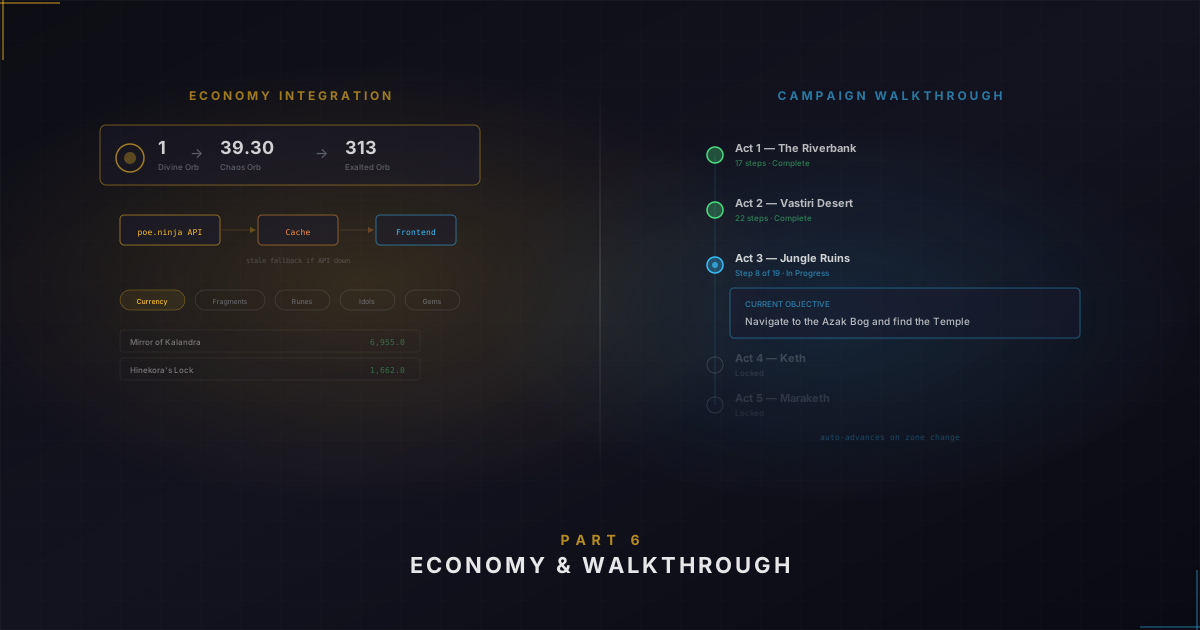
Economy integration: fetching live prices from poe.ninja
If you've played POE2 for any length of time, you know the economy is its own meta-game. Currency values fluctuate based on supply, demand, league age, and whatever the latest broken build is that week. I wanted that information right there in the companion window instead of tabbing out to check poe.ninja.
The poe.ninja team provides a public API that returns current exchange rates for every currency type in the game. You pass in a league name and economy type, and you get back a JSON blob with exchange rates, trade volumes, and item metadata.
Cache-first with stale fallback
The economy data doesn't need to be truly "real-time". Currency prices shift over hours, not seconds. So the first thing the service does when you ask for exchange rates is check the disk cache:
let cache_path = Self::get_league_cache_path(league, is_hardcore).await?;
let cache = FileService::read_json_optional::<LeagueEconomyCache>(&cache_path).await?;

if let Some(ref cache) = cache {
    if let Some(cached) = cache.get_economy_type(economy_type) {
        if cached.is_fresh() {
            return Ok(cached.data.clone());
        }
    }
}
The cache is a JSON file per league with a TTL of 10 minutes. If the cached data is fresh, we return it immediately – no network call, no lock, no waiting. The frontend's React Query stale time is also 10 minutes, so the two caches are aligned.
When the cache is stale or missing, we fetch from poe.ninja. But if the fetch fails, we fall back to returning the stale cached data with an is_stale: true flag. The frontend picks up on that flag and shows "Last known data from 45 minutes ago" instead of "Updated 2 minutes ago". The user still gets useful data. I've had poe.ninja go down for hours during league starts, and Overlord just quietly serves its last good data.
Deduplicating concurrent requests
This is the part that took me the longest to get right. When you first open Overlord and navigate to the economy page, multiple components might request the same data within the same second. Without deduplication, all of those would independently hit the API – wasteful and potentially rate-limited.
The solution is a per-cache-key semaphore. When a request needs to fetch, it first acquires a semaphore scoped to the specific league + hardcore flag + economy type:
let key = Self::cache_key(league, is_hardcore, economy_type);
let semaphore = {
    let mut in_flight = self.in_flight.write().await;
    in_flight.entry(key.clone()).or_insert_with(|| Arc::new(Semaphore::new(1))).clone()
};

let _permit = semaphore.acquire().await?;

// Re-check cache after acquiring lock
if let Some(cached) = cache.get_economy_type(economy_type) {
    if cached.is_fresh() {
        return Ok(cached.data.clone());
    }
}
If two requests come in for the same cache key at the same time, the first one acquires the semaphore and starts fetching. The second one blocks. When the first finishes and writes the cache, it releases the semaphore. The second request wakes up, re-checks the cache (which is now fresh), and returns immediately without making its own API call.
The double-check pattern – check before lock, re-check after lock – avoids the lock entirely when the cache is fresh, and handles the coalescing case where another request populated the cache while we were waiting.
League-specific data handling
POE2 has multiple leagues running simultaneously, and the economy data is completely different between them. The EconomyContext on the frontend pulls the league and hardcore flag from the active character:
const league = activeCharacter?.league || 'Rise of the Abyssal';
const isHardcore = activeCharacter?.hardcore || false;

const { data: currencyData } = useCurrencyExchange(league, isHardcore, selectedEconomyType);
Switch your active character from Standard to a seasonal HC character, and the economy data automatically refreshes for the correct league. No manual toggling.
There's also a display tier system that shows prices in the most readable denomination. Showing "0.002 Divine Orbs" is useless, but "3.2 Chaos Orbs" makes sense. The backend calculates the optimal tier automatically based on value thresholds.
The campaign walkthrough: automatic progress tracking
POE2's campaign spans multiple acts with dozens of zones, quest objectives, boss fights, and rewards. For new players or even experienced ones on a new class, it's easy to lose track of what you're supposed to be doing. I wanted Overlord to show you exactly where you are in the campaign without any manual input.
The foundation is a massive JSON file – walkthrough_guide.json – that defines every act, every step within each act, objectives, completion zones, rewards, and wiki references:
{
  "acts": {
    "act_1": {
      "steps": {
        "act_1_step_1": {
          "title": "Escape The Riverbank",
          "objectives": [{ "text": "Navigate The Riverbank and defeat The Bloated Miller", "required": true }],
          "current_zone": "The Riverbank",
          "completion_zone": "Clearfell Encampment",
          "next_step_id": "act_1_step_2"
        }
      }
    }
  }
}
Each step has a current_zone (where the step starts), a completion_zone (the zone that indicates you've finished it), and linked-list-style next_step_id/previous_step_id pointers.
I wrote the initial version of this guide manually – going through each act, documenting every step, cross-referencing the wiki. Then I iterated on it over a few months as I played through the campaign on different characters.
Per-character progress tracking
Every character has their own walkthrough progress. When you create a character, they start at act_1_step_1. The progress is stored inside the character's JSON file:
pub struct WalkthroughProgress {
    pub current_step_id: Option<String>,
    pub is_completed: bool,
    pub last_updated: DateTime<Utc>,
}
When a character finishes the last step in the last act, is_completed gets set to true. You can also manually advance or rewind progress through the UI if the automatic detection misses something.
Automatic step advancement from zone changes
This is where the walkthrough connects to the log analysis pipeline from Part 3. When the log analysis service detects a scene change, it calls:
walkthrough_service.handle_scene_change(character_id, zone_name).await;The handle_scene_change method checks whether the new zone matches the completion_zone of the character's current step. If it does – say you just walked into Clearfell Encampment and your current step's completion zone is "Clearfell Encampment" – the service advances the progress:
if step.completion_zone == zone_name {
    if let Some(next_step_id) = &step.next_step_id {
        let mut new_progress = progress.clone();
        new_progress.set_current_step(next_step_id.clone());
        self.update_character_walkthrough_progress(character_id, new_progress).await?;

        let event = AppEvent::walkthrough_step_advanced(character_id.to_string(), next_step_id.clone());
        self.event_bus.publish(event).await;
    } else {
        // No next step – campaign complete!
        let mut new_progress = progress.clone();
        new_progress.mark_completed();
        self.update_character_walkthrough_progress(character_id, new_progress).await?;
    }
}
Before advancing, we validate that next_step_id actually exists in the guide. If someone edits the guide JSON and accidentally breaks a step link, we'd rather stop advancing than corrupt the character's progress.
The whole flow: you walk into a zone in the game, POE2 writes a line to Client.txt, the log parser picks it up, the log analysis service processes the scene change, the walkthrough service checks for step completion, advances the progress, saves the character data, publishes events – and on the frontend, the UI updates to show your new current step. All automatic.
How the two features compare
Looking at these two features side by side, the patterns are remarkably consistent even though they solve different problems:
Both follow the same backend domain structure. Both expose data through Tauri commands wrapped in React Query hooks. Both have contexts that sit inside CharacterProvider. Both use caching patterns appropriate to their data – TTL-based for economy, load-once-forever for the walkthrough guide.
Where they differ is in how data flows. Economy data is pull-based – the frontend requests it through commands, the backend fetches from poe.ninja or returns cache. Walkthrough progress is push-based – the backend detects zone changes, advances progress, and pushes events to the frontend.
But at the end of the day they're both domain services following the architecture from Part 1. Once you have the pattern, adding a new feature is mostly filling in the blanks.
What's next
In Part 7 – the final post in this series – we'll look at how all of this gets tested. Covering everything from individual parser regex matches to full component rendering with mocked Tauri commands. Testing a Tauri app has some unique challenges, and I learned a few things doing it that are worth sharing.
If you want to check out the project, head over to the Overlord project page. Thanks for reading and happy coding!